Nothing on the NCP-DB exam asks you to write a query. The Nutanix Database Automation certification, formally Nutanix Certified Professional – Database Automation, tests whether you can run databases as a service on Nutanix Database Service (NDB): deploy the NDB control plane, register and provision engines, patch them in a maintenance window, clone them for developers, and bring a production copy back to a point in time when something goes wrong. The query tuning, the schema design and the engine internals that fill a typical database interview are simply not on the blueprint.
That shift in emphasis is what trips up experienced administrators. VMExam publishes the exam as 75 questions in 120 minutes for $200 USD, with a pass mark of 3000 on a scale of 1000 to 6000, across four syllabus sections that carry no published weightings. Nutanix describes the current paper as the NCP-DB 7.5 exam. This guide walks the four sections, explains why Time Machine sits at the centre of the operate section, and sets out a six week preparation order built around the objectives rather than around any one database engine.
What Does the Nutanix Database Automation Certification Actually Test?
The Nutanix Database Automation certification measures whether a candidate can deploy, administer, optimise and troubleshoot database workloads through Nutanix Database Service. NCP-DB covers the NDB control plane and its automation of provisioning, patching, protection, cloning and recovery across the engines NDB manages. It does not examine SQL, query tuning or engine internals; the subject is the platform that operates the databases.
Nutanix positions the credential at the professional level, one step above the Nutanix Certified Associate and alongside the other specialty NCP tracks such as Multicloud Infrastructure, Unified Storage and Cloud Native. The official page lists the typical candidate as a database administrator or developer, an automation engineer, channel partner staff who perform NDB related work, or an OEM engineer who manages databases on the Nutanix platform, whether on premises or in a public cloud.
The practical consequence is that a strong Oracle or SQL Server DBA with no NDB exposure is not ready, and a Nutanix infrastructure administrator who has never been responsible for a database is not ready either. The exam sits at the join between the two roles, which is exactly where Nutanix Database Service sits in an organisation.
What Are the NCP-DB Exam Format and Passing Score?
NCP-DB is a 75 question multiple choice exam with a 120 minute time limit, priced at $200 USD per attempt and delivered in English and Japanese. VMExam publishes the passing score as 3000 on a scale of 1000 to 6000. Nutanix names the current paper the NCP-DB 7.5 exam and recommends the Nutanix Database Management and Automation course as preparation.
| Exam detail | Value |
|---|---|
| Exam name | Nutanix Certified Professional – Database Automation |
| Exam code | NCP-DB |
| Exam version named by Nutanix | NCP-DB 7.5 |
| Questions | 75 multiple choice |
| Duration | 120 minutes |
| Passing score | 3000 on a scale of 1000 to 6000 |
| Price | $200 USD per attempt |
| Languages | English and Japanese |
| Recommended training | Nutanix Database Management and Automation (NDMA) |
| Section weightings | Not published |
Two things in that table deserve a second look. The scaled score means a raw percentage is never reported, so there is no way to translate 3000 into a number of correct answers, and any page that claims one is guessing. The absence of weightings means the four sections cannot be ranked by marks, which changes how you study: every objective group has to be covered, and the shortest route to a pass is breadth across the whole blueprint rather than depth in a favourite area.
Seventy five questions in 120 minutes gives 96 seconds per item, which is comfortable for recall but tight for the scenario questions that describe an NDB console state and ask what to do next. Working through the NCP-DB sample questions before the real sitting shows the phrasing those scenario items use, and the official Nutanix page links the exam blueprint guide as a PDF for the complete objective list.
Which Four Sections Make Up the NCP-DB Syllabus?
The NCP-DB syllabus has four sections: Deploy and Configure an NDB Solution; Monitor Alerts and Storage Usage within an NDB Implementation; Operate and Maintain an NDB Environment; and Administer an NDB Environment. Together they hold 21 objective groups, and Nutanix publishes no percentage weighting for any of them, so the exam has to be prepared as a whole.
The section names on the VMExam syllabus page and on the official Nutanix page match exactly, and the objective groups beneath them match too. What follows is the structure as both publish it.
| Section | Objective groups | What the objectives cover |
|---|---|---|
| Deploy and Configure an NDB Solution | Deploy an NDB VM; Configure an NDB instance; Deploy and configure NDB High Availability | Installation wizard, network settings and static IP, language and SSL, NTP and DNS from the server CLI, SMTP, high availability deployment, service resiliency, multi-cluster |
| Monitor Alerts and Storage Usage within an NDB Implementation | Manage alerts; Monitor and manage storage usage | Alert monitoring, resolution, policies and retention; source and clone size, storage efficiency, snapshot counts, scaling storage, the Time Machine dashboard |
| Operate and Maintain an NDB Environment | Register database server VMs and databases; Provision databases; Patch NDB-managed entities; Troubleshoot NDB operations; Clone databases; Restore source databases; Manage Time Machine | Prerequisite scripts and release notes, credentials and discovery, engine and profile selection, maintenance windows and software profile versions, diagnostics bundles, clone creation and refresh, snapshot and point in time restore, SLAs and Data Access Management |
| Administer an NDB Environment | Manage NDB profiles; Perform NDB software upgrades; Add Nutanix clusters to NDB; Manage networks in NDB; Manage access controls; Use NDB APIs and end clients | Software, compute, network, database parameter and Windows domain profiles, profile replication, NDB upgrades, cluster registration and storage containers, NDB-managed networks and VLANs, Active Directory and custom roles, CLI and API |
Counting the objective groups is the nearest thing to a weighting that the blueprint offers. The operate section has seven, the administer section has six, deployment has three and monitoring has two. That does not prove the operate section carries the most questions, but it does show where the breadth of knowledge is expected, and candidates who report the paper as operations heavy are describing the blueprint accurately.
How Do Provision, Patch, Clone and Restore Fit Together in NDB?
In Nutanix Database Service the four operations form one lifecycle around a database. Provisioning creates a database server VM and instance from profiles; patching moves that server to a newer software profile version inside a maintenance window; cloning produces a copy from a Time Machine snapshot or a point in time; restore returns the source to an earlier state. The NCP-DB operate section tests all four as linked tasks.
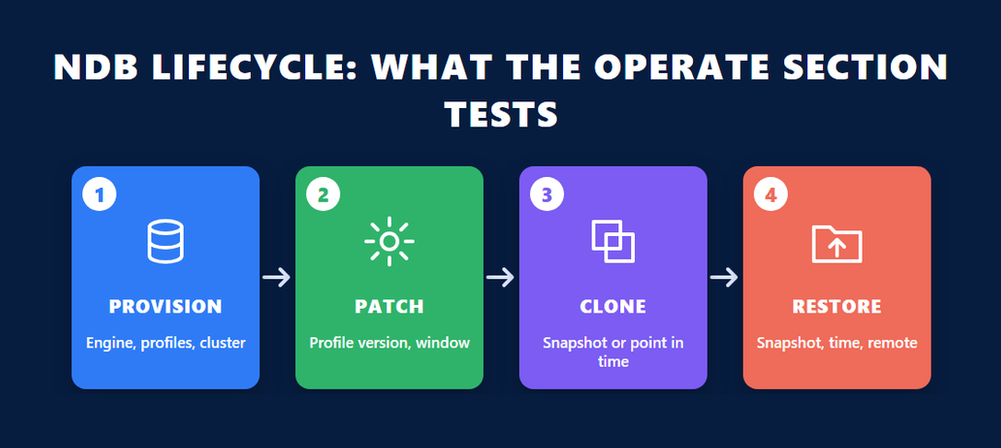
Provisioning starts the chain. The objectives ask you to select the engine, choose a single instance or a high availability instance, pick the Nutanix cluster or clusters, select the profiles that define software, compute, network and database parameters, and name and size the database. Every one of those choices is reused later, because a clone inherits a profile and a patch targets a software profile.
Patching through software profile versions
NDB does not patch a database server directly. It publishes a new version of the software profile, either image based or as an incremental package, tests it according to the engine vendor’s process, and then applies it immediately, on a schedule, or inside a maintenance window that you created and associated with the entity. Expect questions that describe a profile version that has been created but not published, or a maintenance window that exists but is not associated, and ask why the patch did not run.
Cloning for the people who are not DBAs
Cloning is where NDB earns its keep with development teams. The blueprint asks you to determine the business requirement first, then create the clone either onto an authorised existing VM or a new target, with pre and post create scripts, from a manual snapshot or a point in time, and optionally from a remote cluster. Clones can then be refreshed on a schedule or by hand. The exam treats refresh as a first class operation, not an afterthought.
Restore as the test of everything before it
Restore is listed with three forms: from a snapshot, to a point in time, and from a remote cluster. Each depends on protection that was set up earlier through the Time Machine, which is why the next section matters more than its single objective group suggests.
What Is Time Machine and Why Does It Dominate the Operate Section?
Time Machine is the NDB component that protects a registered or provisioned database by taking snapshots and capturing transaction logs on a schedule defined by an SLA. It is what makes point in time clones and restores possible, and its dashboard is also where the monitoring section expects you to read storage utilisation. In NCP-DB, Time Machine objectives appear under both the operate and the monitor sections.
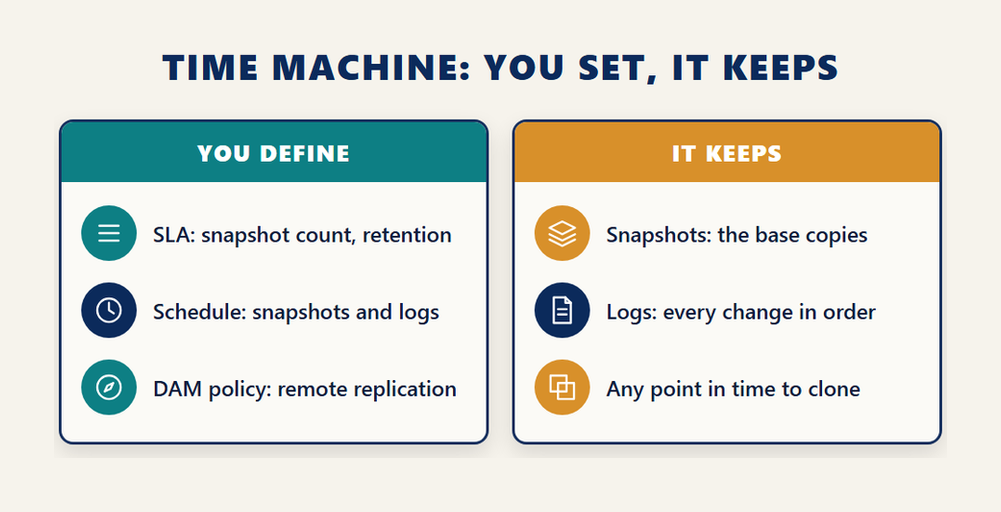
The manage Time Machine objective group asks for three skills. First, determine the requirements: how many snapshots to keep, which schedule and retention policy applies, and how much storage that policy will consume. Second, create custom SLAs when the out of the box ones do not fit. Third, manage the Data Access Management policy, which controls replication of snapshots and logs to remote clusters, and protect databases by applying an SLA and taking manual snapshots.
The mechanism behind point in time recovery is the same one every major engine uses for its own backups: a base copy plus an ordered stream of logs that can be replayed up to a chosen moment. The PostgreSQL documentation on continuous archiving describes that model for one engine; Time Machine applies it across every engine NDB manages, with the snapshot as the base copy and log catch-up as the stream. A Nutanix architecture write-up on MySQL under NDB puts it precisely.
“Each snapshot is stamped with the executed GTID set at the moment of capture. Log catchup archives every subsequent GTID in strict order.”
For the exam, the practical reading of that quote is that a point in time clone or restore needs both halves. If log catch-up has not run since the last snapshot, the only recoverable states are the snapshots themselves. Questions that describe a restore to a time between snapshots are really asking whether you understand what the log capture schedule in the SLA is for.
Storage is a Time Machine question too
The monitoring section asks you to identify source and clone size, watch storage efficiency, track the number and size of snapshots, and scale or extend storage for a database. All of those numbers surface on the Time Machine dashboard. A retention policy that keeps too many daily snapshots shows up first as storage growth, so the monitoring objectives and the SLA objectives are two views of one decision.
What Does the Administer Section Expect From Profiles, Networks and Access?
The administer section of NCP-DB covers the configuration that every provisioning and patching task depends on: five profile types, NDB software upgrades, adding Nutanix clusters, NDB-managed networks and VLANs, Active Directory integration with custom roles, and the CLI and API. It is the section that separates someone who uses NDB from someone who runs it for other people.
The profile objectives name five profile types: software, compute, network, database parameters and Windows domain. You are expected to create each, manage its status, recognise the out of the box software profiles, and replicate a software profile to a remote cluster. Because a provisioning request is assembled from profiles, a wrong or unpublished profile is the most common root cause the exam can describe without naming it.
Clusters and networks
Adding a Nutanix cluster to NDB means verifying prerequisites, registering the cluster and configuring its storage containers. Networks are either NDB-managed, where NDB hands out addresses from a pool you define, or externally managed; the objectives ask when to use an NDB-managed network, how to create one and how to add a VLAN. The multi-cluster objective in the deployment section connects here, since a clone from a remote cluster needs that cluster registered and reachable.
Access control and the API
Access control questions centre on Active Directory integration and on roles: creating custom roles, mapping users and groups, creating users and groups, and sharing entities between them. The final objective group asks you to select the right tool for a task among the console, the CLI and the REST API, and to use the API equivalent button in the console, which exposes the call behind a UI action. That button is worth practising, because it turns every manual task into an automation example, and automation is the word in the credential’s name.
Who Should Sit NCP-DB, and How Long Does It Stay Valid?
Nutanix describes the successful NCP-DB candidate as having roughly one to two years of database experience and at least six months of hands-on NDB experience, on premises or in public cloud. The credential is valid for three years for anyone certified on or after 1 August 2025, under the policy Nutanix announced on its education blog, and earning a new NCP recertifies every active NCP and NCA credential you hold.
The experience guidance is advisory rather than enforced; there is no prerequisite certification and nothing to upload before booking. In practice the six months of NDB matters more than the two years of database work, because the exam asks about console workflows, profile behaviour and SLA settings that cannot be reasoned out from general database knowledge.
The validity change is recent enough to be worth stating plainly. Nutanix announced on its certification policy update that all technical certifications moved from a two year to a three year validation period, that certifications at version 6.5 or higher were extended automatically, and that earning a new NCP recertifies all active NCP and NCA certifications. Older third-party pages still quote two years; the Nutanix post is the current position.
For someone deciding whether NCP-DB or a different Nutanix track comes first, the recertification rule is an argument for taking the associate level early. An earlier look at the Nutanix Certified Associate covers what that entry credential validates and who it suits; passing NCP-DB afterwards renews it rather than leaving two expiry dates to track.
How Should You Prepare for NCP-DB in Six Weeks?
Prepare for NCP-DB by working the blueprint in dependency order rather than section order: deploy NDB, build profiles and networks, register and provision a database, protect it with an SLA, then clone, patch and restore it. Six weeks of two to three sessions a week is realistic for someone already using NDB; a candidate new to the product needs the NDMA course first.
- Read the official exam blueprint guide end to end and copy every objective group into a checklist, because the exam publishes no weightings and every group has to be covered.
- Deploy an NDB VM in a lab, assign a static IP from the console, and complete the basic configuration items: language, SSL certificate, NTP and DNS from the server CLI, and SMTP.
- Create one of each profile type, including a Windows domain profile, and replicate a software profile to a second cluster so you understand profile status and publication.
- Register an existing database server VM and its database, then provision a new high availability instance, so you have seen both routes into NDB and their prerequisite scripts.
- Apply a custom SLA to a database, confirm log catch-up is running, then perform a point in time clone and a point in time restore from the same Time Machine.
- Patch the provisioned instance by creating, publishing and applying a new software profile version inside a maintenance window you created yourself.
- Finish with alerts, storage and the API: resolve an alert, read the Time Machine dashboard for storage, and reproduce one console action through the API equivalent button and the CLI.
Each step produces a working state the next step depends on, so a failure at step four tells you something is wrong in step three. That is also how the exam’s scenario questions are constructed. If you want a second Nutanix credential in view while you plan, the recent guide to the NCP-AI certification shows how another specialty NCP divides its objectives, and the overlap in platform knowledge is larger than the different subject suggests.
Keep the official NCP-DB certification page open while you work; it carries the knowledge objectives, the exam details and the link to the exam blueprint guide, and a change to either shows up there before it reaches any third-party summary.
Frequently Asked Questions
How many questions are on the NCP-DB exam?
Seventy five multiple choice questions, with a time limit of 120 minutes. Both the VMExam syllabus page and the official Nutanix certification page publish the same figures.
What is the NCP-DB passing score?
VMExam publishes the passing score as 3000 on a scale of 1000 to 6000. The official Nutanix page does not display a passing score, and because the score is scaled there is no published way to convert it into a number of correct answers.
How much does the Nutanix Database Automation certification cost?
The exam fee is $200 USD per attempt, as stated on the Nutanix certification page. The recommended Nutanix Database Management and Automation course is priced separately.
Does NCP-DB publish domain weightings?
No. Neither Nutanix nor the VMExam syllabus page gives a percentage for any of the four sections. The operate section has the most objective groups at seven, which is the only structural signal available.
Which version of the exam is current?
The Nutanix certification page describes the current paper as the NCP-DB 7.5 exam. Check that page before booking, because it is where a version change appears first.
Do I need to know a specific database engine for NCP-DB?
No single engine is examined. The objectives are about NDB operations such as provisioning, patching, cloning, restoring and Time Machine management, which work across the engines NDB supports. Engine specific tuning is not on the blueprint.
What languages is the NCP-DB exam offered in?
English and Japanese, according to the Nutanix certification page, which also links the exam blueprint guide in both languages.
How long is the NCP-DB certification valid?
Three years for certifications earned on or after 1 August 2025, under the policy Nutanix announced on its education blog. Earning a new NCP certification recertifies all of your active NCP and NCA credentials.
Is there a prerequisite for NCP-DB?
No prerequisite certification is listed. Nutanix recommends about one to two years of database experience and at least six months with NDB, and names the NDMA course as the related training, but none of these is enforced at booking.
What is Time Machine in NDB?
Time Machine is the NDB protection component that takes snapshots and captures logs for a database according to an SLA, which is what allows clones and restores to a point in time. It is examined in both the operate and the monitor sections of NCP-DB.
Conclusion
The Nutanix Database Automation certification rewards people who can operate a database platform rather than people who can tune a database. NCP-DB asks 75 questions in 120 minutes across four sections with no published weightings, so every objective group counts, and the operate section with its seven groups is where the breadth lives. Time Machine is the concept to understand first, because cloning, restore and storage monitoring all depend on it, and profiles are the concept to understand second, because provisioning and patching are assembled from them. Work the blueprint in dependency order in a lab, keep the official Nutanix page open for the version and the blueprint PDF, and treat the three year validity and the shared recertification rule as reasons to plan NCP-DB as part of a Nutanix path rather than a standalone exam.


